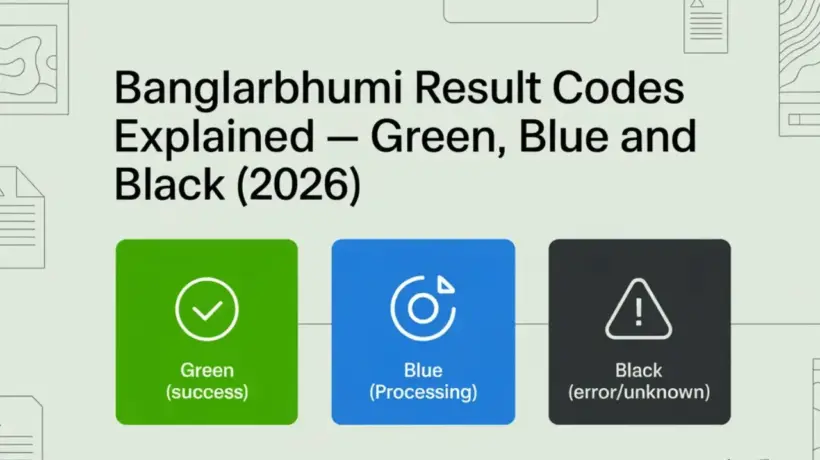
You searched for your land record on BanglarBhumi — and instead of just showing the data, the portal showed it in a colour. Green, blue, or black. Now you’re wondering what that colour actually means and whether your record is okay.
Don’t worry — these colours are just a quick way for BanglarBhumi to tell you how current and reliable your land record data is. They’re not pass or fail. They don’t mean your land is safe or unsafe. They simply tell you the status of the data in the system.
This guide explains what each colour means in simple language — and what you should do next based on which colour you see.
Where Do You See These Colour Codes on BanglarBhumi?
When you search for land records through the “Know Your Property” section on banglarbhumi.gov.in — using your Khatian number, plot (Dag) number, or owner’s name — the results appear with a colour indicator. This colour tells you the freshness and reliability of the data being shown.
You’ll typically see this when searching for:
🟢 Green Result Code — What It Means
Green is the best result you can see. It means the land record data being shown to you is live, centrally stored, and up to date.
In simple words — when you see green, the information on the screen (owner name, plot area, land classification, Khatian number) directly matches the official government database right now. There’s no lag, no old version, no pending update. What you see is current.
What green means for you practically
What to do when you see green
If the details shown are correct — great, you’re done. Take a screenshot or note down the Khatian and plot numbers. If you need a legally valid document for a bank or court, go ahead and apply for a certified e-Porcha from the portal. Here’s how to download your e-Porcha.
If the details are wrong even though the code is green — for example, the owner name is someone else, or the area is different from what your documents say — file a grievance on BanglarBhumi. Green means the data is current, not that it’s error-free. Errors do exist even in live records.
🔵 Blue Result Code — What It Means
Blue means the land record exists in the system, but the data is older — what the portal calls “legacy data”. The record was digitised from older physical documents and may not reflect recent changes like a mutation, land correction, or ownership transfer.
Think of it this way — the land is real, the record is there, but the information might be showing an older state of things. It’s like a photo from 5 years ago — the person exists, but things may have changed since the photo was taken.
What blue means for you practically
What to do when you see blue
Take out your sale deed, mutation certificate, or old Khatian copy and compare the details. If your documents match what BanglarBhumi is showing, you’re probably fine — the record just hasn’t been refreshed to live status yet.
After a mutation is approved, it takes some time for the system to update the data to live (green) status. If your mutation was completed recently, check again after 2 to 4 weeks. It will likely turn green.
If the blue record shows details that don’t match your documents — especially the owner name — go to your Block Land Records Office (BLLRO) and ask them to verify and update the record. Bring your physical documents as proof.
If you applied for mutation months ago, it was approved, but the record is still showing blue with old data — file a complaint on BanglarBhumi. Go to Public Grievance → Grievance Application and describe the issue. This often speeds up the update.
⬛ Black Result Code — What It Means
Black means the portal found no data at all for the search you made. No record came up. The page either shows nothing, shows a black/empty result, or shows a “Record Not Found” type message.
This is the one that worries people the most — but in many cases, it’s not as serious as it looks. Black doesn’t automatically mean the land doesn’t exist or that there’s a problem with ownership.
Common reasons you get a black result
| Reason | How likely | What to do |
|---|---|---|
| Wrong Mouza selected | Very common | Recheck the Mouza name from your documents and try again |
| Wrong Khatian or Plot number entered | Very common | Double check the number — even one digit wrong gives black |
| Wrong District or Block selected | Common | Confirm district and block from old documents and reselect |
| Land record not yet digitised | Fairly common for old land | Visit BLLRO office — they have physical records and can digitise it |
| Data entry error during digitisation | Occasional | BLLRO office can correct the entry — file a grievance if needed |
| Portal server issue at the time of search | Occasional | Try again after some time or during off-peak hours |
What to do when you see black
Go back and verify your District, Block, and Mouza selection. Then check the Khatian or plot number — even a single wrong digit returns black. This simple re-check solves the problem most of the time.
If you searched by Khatian number, try by plot (Dag) number instead. If you have the owner’s name, try the name search through “Know Your Property”. Sometimes one method works when another doesn’t.
If the portal server was slow or overloaded at the time of your search, you might get black even if the record exists. Try again early morning (before 9 AM) or late at night when the server is quieter.
If you’ve tried everything online and still get black, this is the next step. The BLLRO office has physical records that may not have been digitised yet. They can look it up manually and also tell you what’s needed to get the record into the online system.
If you have documents proving the land exists (sale deed, old Khatian copy, tax receipts) but BanglarBhumi keeps showing black — file a formal grievance. Go to Public Grievance → Grievance Application on the portal and attach your documents. This gets the issue escalated to the right department.
Green vs Blue vs Black — Quick Comparison
| Colour | What it means | Data status | What to do |
|---|---|---|---|
| 🟢 Green | Record found, data is live and current | Best — up to date | Verify details, proceed with confidence |
| 🔵 Blue | Record found, but data may be older | Exists — needs cross-check | Verify with physical documents or BLLRO |
| ⬛ Black | No record found for your search | Not found online | Recheck inputs, try different method, visit BLLRO |
Which Colour Is Safe When Buying Property?
This is the question most property buyers have. Here’s the honest answer:
Green is ideal. If the seller’s name appears in green, the record is live and current. That’s a strong sign. But green alone is not enough — you should still get a certified e-Porcha and check for any mutation history before buying.
Blue needs verification. Don’t reject a property just because the result is blue. Many legitimate, perfectly fine land records show blue simply because they haven’t been refreshed to live status yet. Cross-check with the seller’s physical documents, check the mutation certificate, and if everything matches — you can proceed. Just do your due diligence.
Black means investigate further. If the seller claims to own land but it shows black on BanglarBhumi even with the correct details — be very careful. Ask the seller to explain why the record isn’t visible. Request physical documents and verify them at the BLLRO office before going any further. This doesn’t mean fraud for sure, but it needs extra care.
Frequently Asked Questions
To Sum It Up
The colour codes on BanglarBhumi are just a quick signal about how fresh and current your land record data is — nothing more, nothing less.
Green is current and live. Blue is older but real. Black means nothing came up — which is usually a search input issue, not a real problem with the land.
Whatever colour you see — don’t make any big decision based on the portal result alone. For anything important like buying land, getting a bank loan, or settling a dispute — always get a certified e-Porcha from BanglarBhumi and verify it alongside your physical documents.
→ Complete BanglarBhumi Guide — Everything in One Place
→ How to Check Khatian and Plot Number on BanglarBhumi
→ How to Download e-Porcha (Certified RoR) from BanglarBhumi
→ What is Mutation and How to Apply on BanglarBhumi
→ How to File a Grievance on BanglarBhumi
→ BanglarBhumi Portal Not Working? Here’s What to Do
→ How to Search Land Records by Owner Name on BanglarBhumi
Got a question about what you’re seeing on your screen? Drop it in the comments and we’ll help you figure it out.