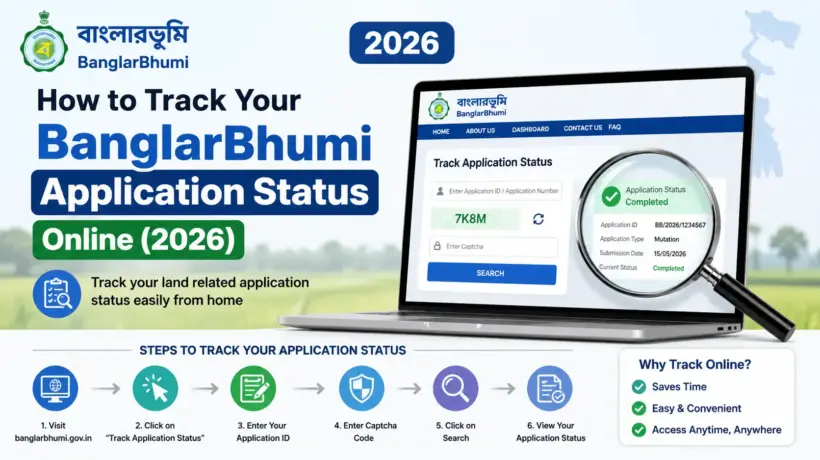
You applied on BanglarBhumi — maybe for mutation, maybe for land conversion, maybe for an e-Porcha or a Mouza Map. You paid the fee. You noted down the application number. And now you’re wondering — what’s happening with it? Is it stuck? Did it get approved? When will it be done?
This is one of the most common frustrations people have with BanglarBhumi. The portal doesn’t send you SMS updates. Nobody calls you. You just have to check yourself. And the tricky part is — different types of applications have different ways to check the status. Mutation works differently from conversion. GRN Search is separate from Mutation Status. Grievance has its own tracking with a UPN number.
This guide covers all of it — every single type of application on BanglarBhumi and exactly how to check its status. By the end you’ll know which screen to go to, what number to enter, and what each status message actually means.
Why BanglarBhumi Has Different Tracking Systems for Different Applications
Before jumping into the steps, it helps to understand why you can’t just check one single “status” page for everything.
BanglarBhumi offers multiple services — mutation, conversion, e-Porcha, Mouza Map, Khajna, grievances. Each of these goes to a different government department or officer for processing. So the portal has separate tracking systems for each:
| Application Type | Tracking Method | Number You Need |
|---|---|---|
| Mutation (Dakhil Kharij) | Citizen Services → Online Service Status → Mutation Status | Case Number or Deed Number |
| Land Conversion | Citizen Services → Online Service Status → Conversion Status | Plot Number or Khatian Number |
| e-Porcha (RoR Certificate) | Citizen Services → GRN Search | Application Number + GRN Number |
| Mouza Map / Plot Map | Citizen Services → GRN Search | Application Number + GRN Number |
| Public Grievance | Public Grievance → Grievance Status/Description | UPN (Unique Petition Number) |
| Any fee payment | Citizen Services → GRN Search | GRN Number |
Find your application type in the table above, and then scroll to that section below.
1. How to Check Mutation Application Status on BanglarBhumi
Mutation — also called Dakhil Kharij in West Bengal — is the process of updating land ownership records after a sale, inheritance, or gift. It’s one of the most common applications on BanglarBhumi and also one of the most anxiously tracked. People want to know if it’s approved before they do anything else with the land.
Log in to BanglarBhumi. Go to banglarbhumi.gov.in and sign in with your mobile number and password.
Go to Mutation Status. Click Citizen Services → Online Service Status → Mutation Status.
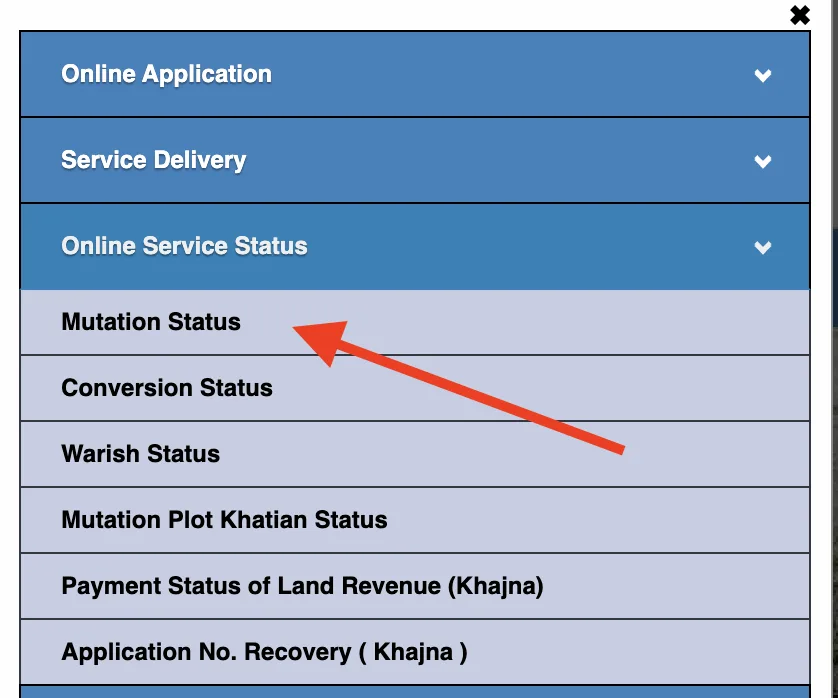
Choose your search method. You can search by three ways — Case Wise (enter your mutation Case Number), Deed Wise (enter the deed number from your sale deed), or Location Wise (select District, Block, Mouza and search by seller/buyer name). Pick whichever you have details for.
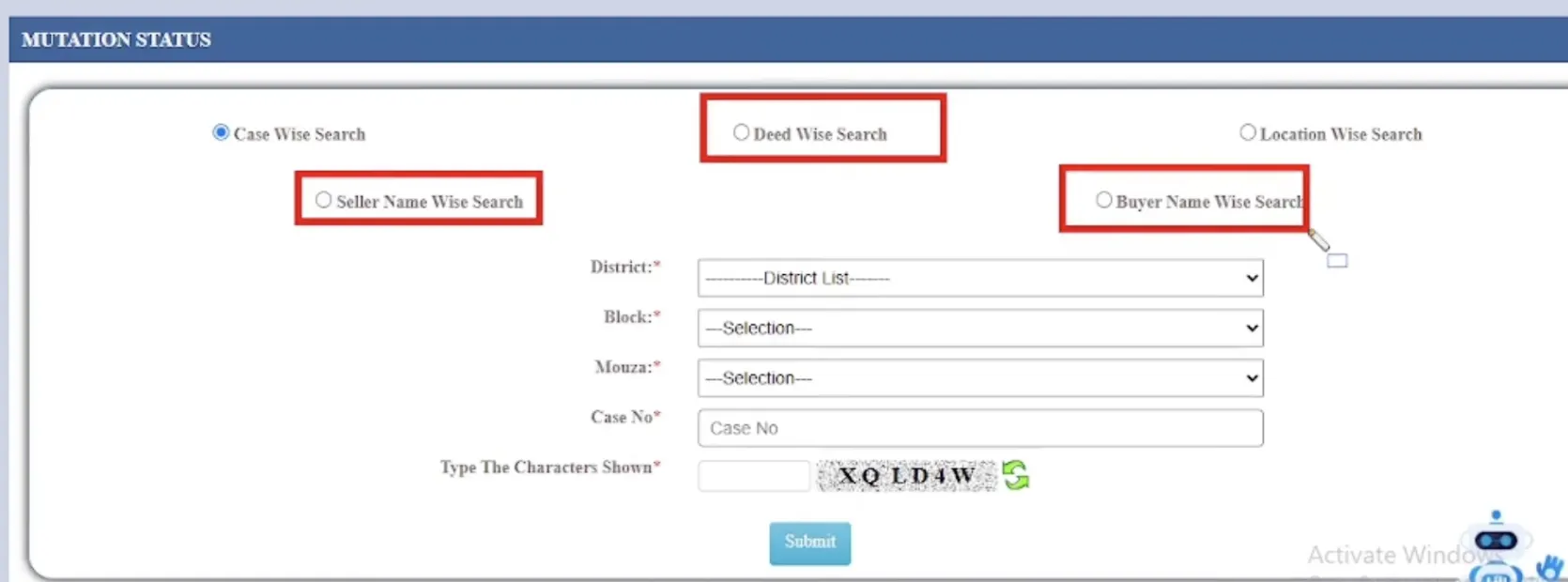
Enter the details and solve the captcha. Type the number carefully — one wrong digit will show no results.
Click Search / Submit. The current status of your mutation case will appear on screen — along with case number, plot details, and the officer’s action if any.
Here’s what the mutation status messages mean:
| Status | What it Means | What to Do |
|---|---|---|
| Application Submitted | Your application is in the system but review hasn’t started yet | Wait — check again in a few days |
| Under Process / Pending | The BLLRO officer is reviewing your case. May call for hearing. | Stay available on your registered mobile — officer may contact you |
| Hearing Scheduled | Officer has scheduled a hearing for your case | Attend the hearing at the BLLRO office on the date mentioned |
| Approved / Disposed | Mutation is approved — records have been updated | Download your mutation certificate from Service Delivery |
| Rejected | Application rejected — reason will be mentioned | Read the reason, fix the issue, and reapply |
2. How to Check Land Conversion Application Status
Applied for land conversion on BanglarBhumi — changing agricultural land to residential or commercial? Here’s how to track it.
Log in to BanglarBhumi and click Citizen Services → Online Service Status → Conversion Status.
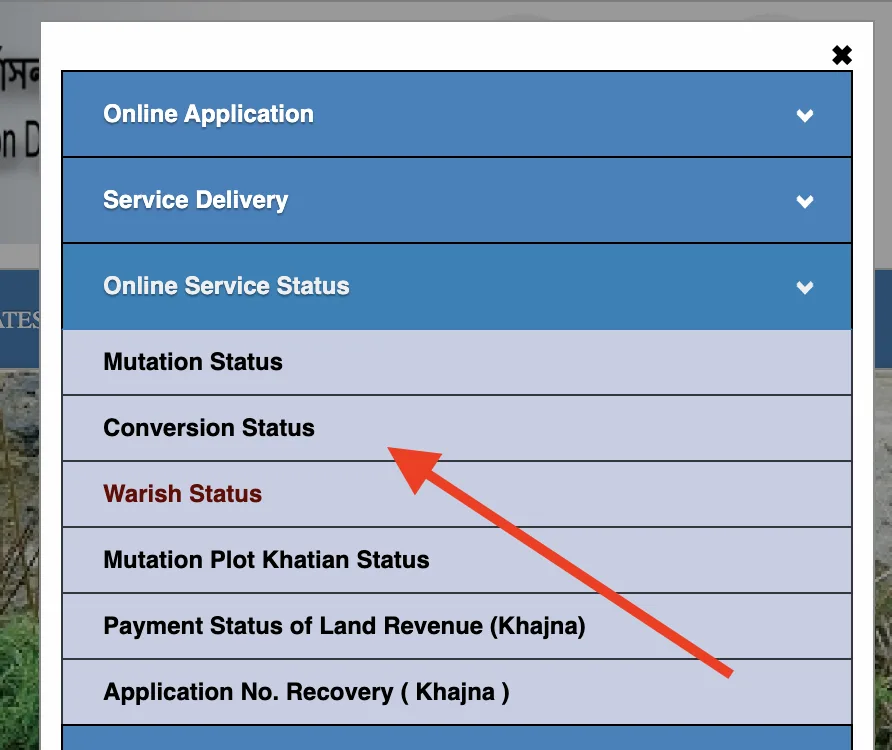
Choose search type. Select either Plot Wise or Khatian Wise.
Select District, Block, and Mouza from the dropdowns.
Enter your Plot Number or Khatian Number, solve the captcha, and click Submit.
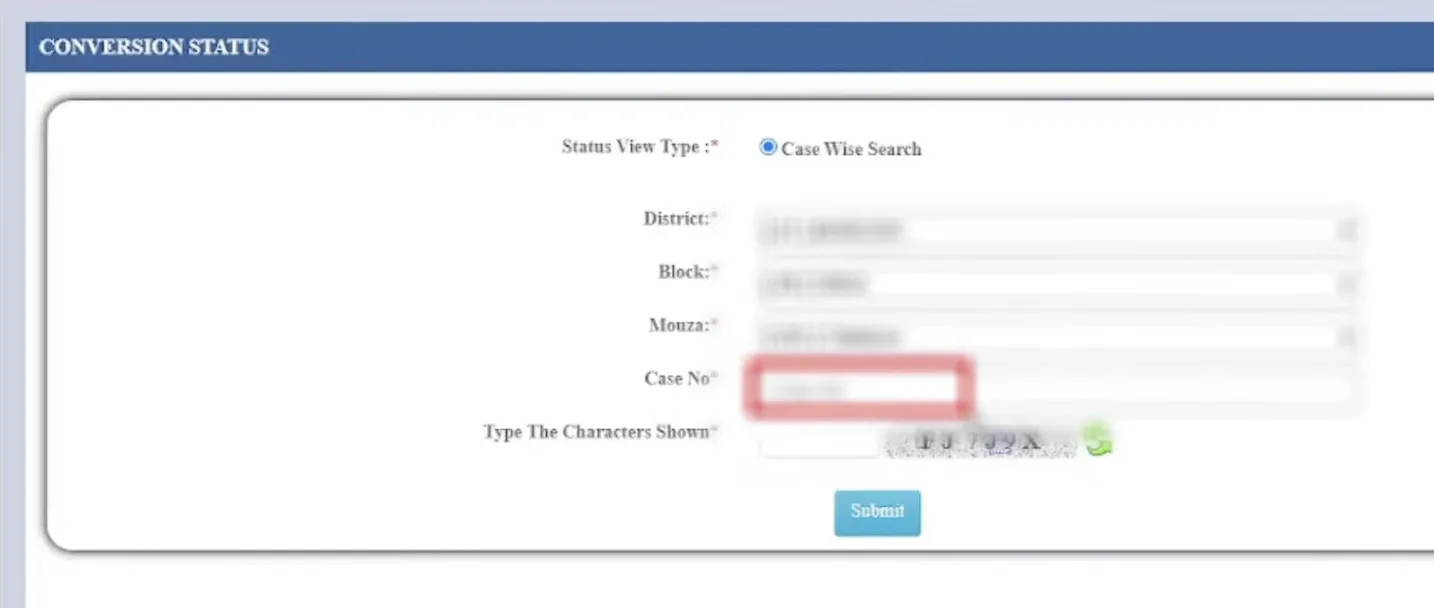
Your conversion application status will show on screen — Pending, Under Review, Approved, or Rejected.
For a detailed breakdown of what each conversion status means and what to do when it’s rejected, see our full guide on land conversion application on BanglarBhumi.
3. How to Check e-Porcha / RoR Application Status
Applied for a certified e-Porcha (Record of Rights) and want to know if it’s ready to download? This uses the GRN Search tool.
Log in to BanglarBhumi and go to Citizen Services → GRN Search.
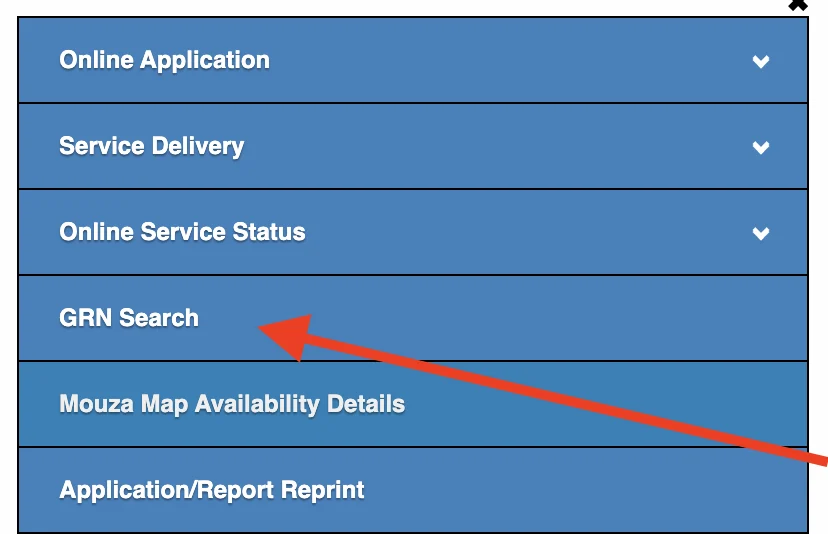
Select Request Type as “RoR / Plot Info / Plot Map” from the dropdown.
Enter your Application Number and GRN Number. Both are on your payment receipt.
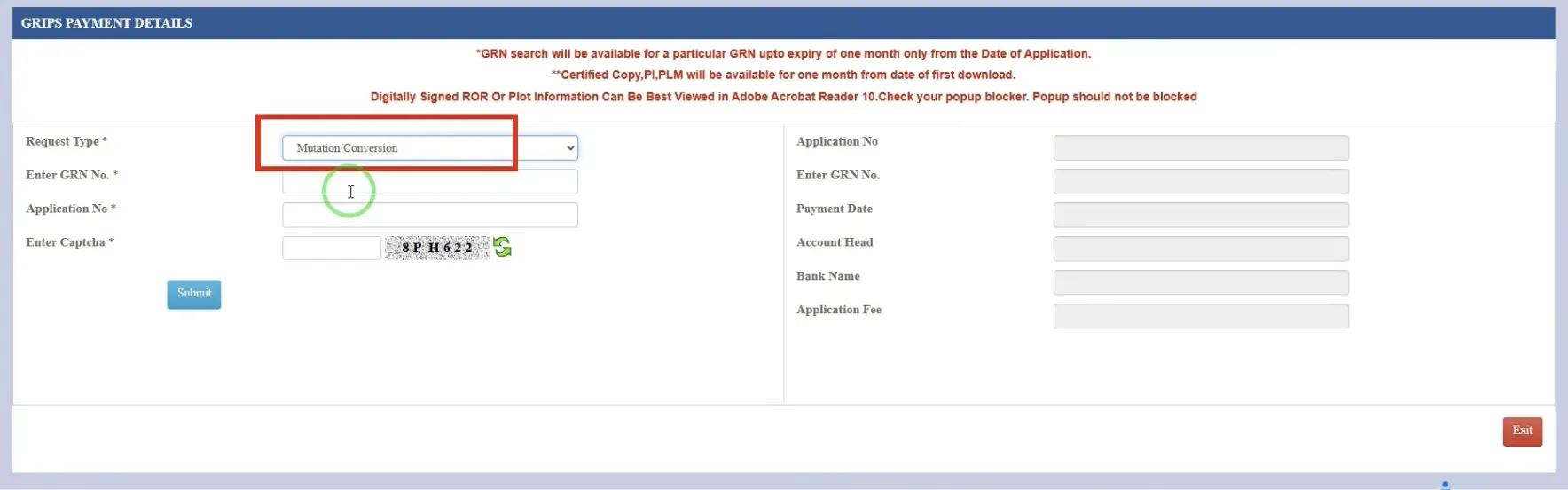
Solve captcha and click Submit.
If the e-Porcha is ready — a Download PDF button will appear. Click it and save your certificate. If it shows “Digitally signed copy not yet generated” — the BLLRO office hasn’t processed it yet. Try again after 24–48 hours.
4. How to Check Mouza Map / Plot Map Status
Same process as e-Porcha — uses GRN Search.
Log in and go to Citizen Services → GRN Search.
Select “RoR / Plot Info / Plot Map” as the Request Type.
Enter your Application Number and GRN Number. Solve captcha and Submit.
Download button appears when the map is ready. No button = still processing. Check back in 24–72 hours.
For a full walkthrough of downloading the Mouza Map including error fixes, see our guide on how to download Mouza Map from BanglarBhumi.
5. How to Check Public Grievance Status (UPN Tracking)
Filed a complaint on BanglarBhumi about a land record error, mutation delay, or any other issue? You track it using your UPN — Unique Petition Number. This is different from an application number or GRN — it’s generated specifically when you submit a grievance.
Go to the BanglarBhumi homepage. You don’t even need to log in for this one.
Click on Public Grievance in the main menu → Grievance Status / Description.
Enter your UPN (Unique Petition Number) and solve the captcha.
Click Show. The current status of your complaint will appear — including the officer’s remarks, what action has been taken, and whether the issue is resolved or still pending.
6. How to Confirm a Payment Went Through (GRN Search for Fee Payments)
Paid a fee on BanglarBhumi — for Khajna, mutation, conversion, or any other service — and not sure if the payment was actually recorded? GRN Search confirms this too.
Log in and go to Citizen Services → GRN Search.
Select the correct Request Type from the dropdown — Mutation/Conversion, RoR/Plot Info/Plot Map, Revenue (for Khajna), or BRIK Field.
Enter your GRN Number and Application Number. Solve captcha and Submit.
The result will show whether the payment was successful, what it was for, and the current processing status.
What to Do When Your Application is Stuck for Too Long
You’ve been checking status every day. It’s been weeks. Still showing “Pending” or “Under Process.” Here’s a step-by-step approach to move things forward — in order of escalation:
Verify your payment trail first. Before assuming anything is wrong with your application, confirm via GRN Search that your payment is showing as successful. In some cases the application appears stuck simply because payment didn’t record properly.
Check if your documents were complete. Log back into your application and review the documents you uploaded. Missing or incorrect documents are the number one reason applications sit idle without being processed. For mutation, this is usually a missing heir certificate or deed. For conversion, a missing NOC or sketch map.
File a Public Grievance. Go to Public Grievance → Grievance Application. Mention the application type, your Application Number, GRN, payment date, and how many days have passed. This creates an official complaint record and usually gets things moving. Save your UPN after submitting.
Call the helpline. BanglarBhumi toll-free number is 1800-345-6600 (free call). Keep your Application Number and GRN ready before calling. Describe the issue clearly — which application type, when submitted, what the current status shows.
Visit your BLLRO office in person. Bring your Application Number, GRN, payment receipt, and a printout of the current status showing “Pending.” The Block Land & Land Reforms Officer can directly check your file and tell you exactly what’s causing the delay — and often resolve it the same day.
Reference: Expected Processing Times for Each Application
This is the most practical thing to know — how long is “normal” to wait before you should start following up:
| Application Type | Normal Processing Time | Maximum Before Follow-up |
|---|---|---|
| Mutation (Dakhil Kharij) | 6 to 21 days | 28 days — after this, file a grievance |
| Land Conversion (residential) | 30 to 45 days | 60 days — after this, visit BLLRO |
| Land Conversion (industrial/commercial) | 60 to 90 days | 90 days — after this, file a grievance |
| e-Porcha / RoR Certificate | 24 to 72 hours | 7 days — after this, file a grievance |
| Mouza Map / Plot Map | 24 to 72 hours | 7 days — after this, visit BLLRO |
| Public Grievance resolution | Varies by issue type | 30 days — escalate to district office |
These are practical benchmarks — not official guarantees. Actual times can vary depending on your district, the officer’s workload, and whether your application needs a physical site visit or hearing.