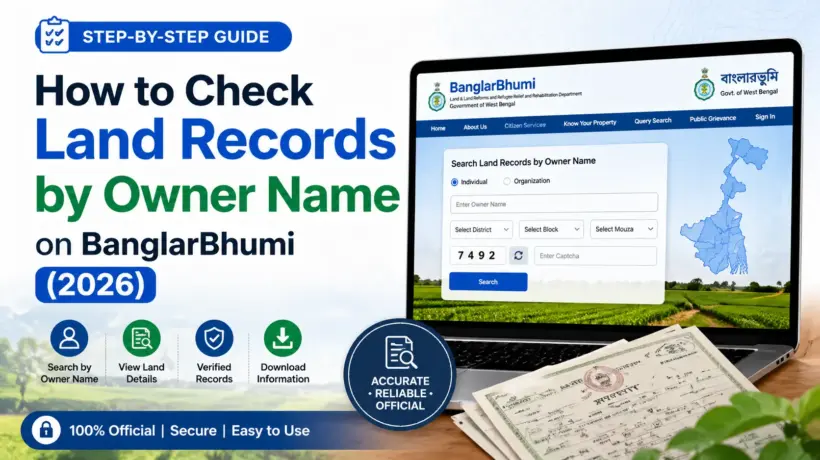
Most people who come to BanglarBhumi for the first time have the same problem — they know the land belongs to their family, but they don’t have the Khatian number or plot (Dag) number written down anywhere. So they wonder: can I just search by the owner’s name?
The answer is — yes, you can. BanglarBhumi does allow you to search land records using the owner’s name, though there’s one important thing to understand first: it works through a section called “Know Your Property”, and you need to select the correct District, Block, and Mouza before the name search becomes available.
This guide walks you through the exact steps, explains what to do if the name search doesn’t give results, and covers all the other ways you can find land records without a Khatian number.
Why Would You Search by Owner Name?
Most people end up needing this when:
All of these are very common situations — and BanglarBhumi handles all of them through the “Know Your Property” feature.
How to Search West Bengal Land Records by Owner Name — Step by Step
Here’s the exact process. Follow these steps carefully, especially steps 3 and 4 — most people get confused there.
Go to banglarbhumi.gov.in in your browser. You don’t need to log in for a basic owner name search — it works without an account.
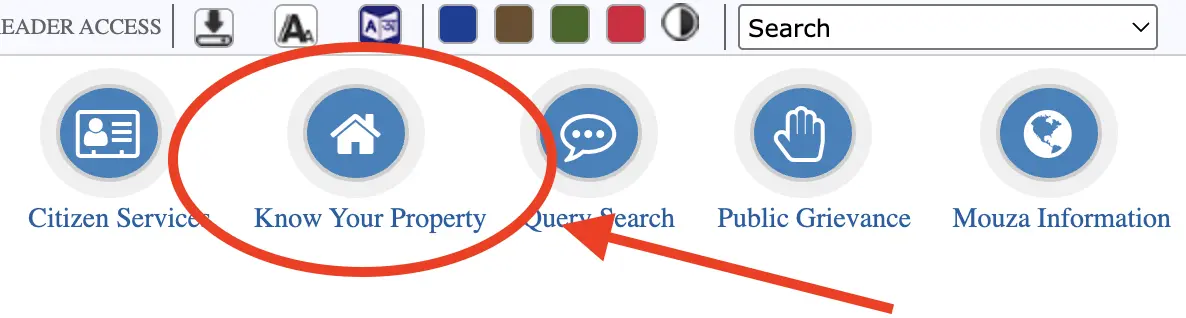
On the homepage, look for the “Know Your Property” option under the Citizen Services section or main menu. Click on it.
This is the most important step. You must select the correct area first — the search won’t work without it. From the dropdown menus, select your District, then your Block, and then your Mouza. Take your time here — selecting the wrong mouza is the most common reason people don’t find the record.
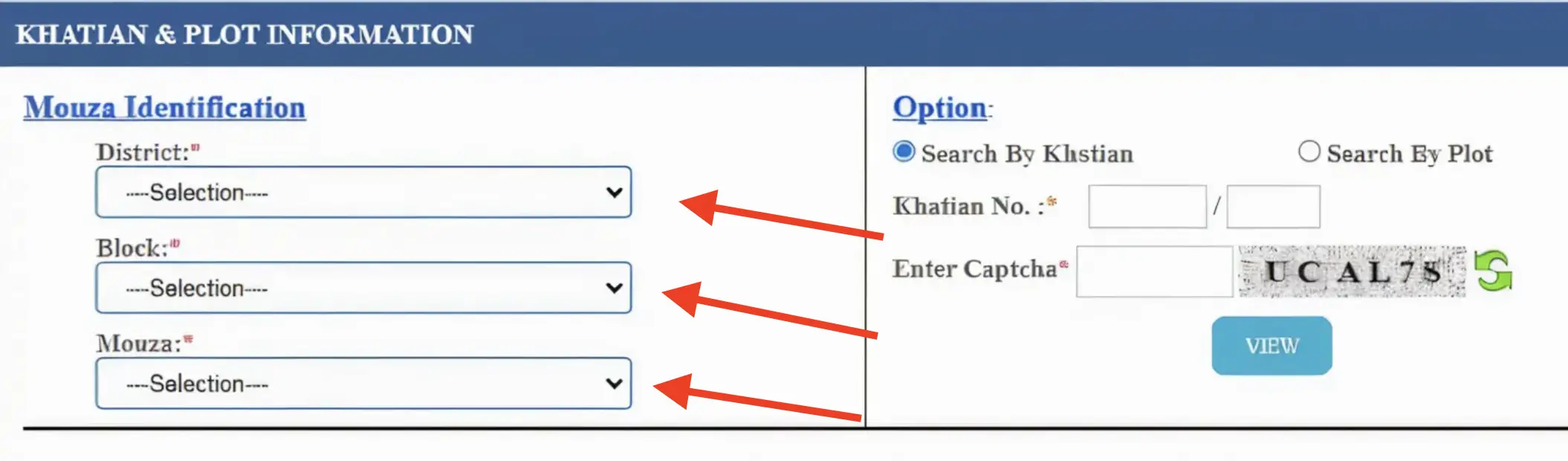
After selecting your mouza, you’ll see search options. Look for a search type that says “Name” or “Owner Name”. Select it. If you don’t see this option, try the Khatian or Plot number search instead.
Type the owner’s name in the search box. The name must match exactly as it appears in the official land record. Even a small spelling difference can mean no results. If the first attempt gives nothing, try different spellings.
Enter the captcha code shown on screen and click “View”. If the captcha doesn’t load, refresh the page or switch to Chrome and try again.
The portal will show land records matching that name in the selected mouza. You’ll see owner’s name, Khatian number, plot number, land area, and land classification. If multiple records appear, look through them to find the right one.
What to Do If the Name Search Shows No Results
This is frustrating but very common. Here are the things to try, in order:
Try different spellings of the name
Land records in West Bengal were entered into the digital system from old physical documents — and the data entry sometimes has spelling variations. For example, “Ramesh” might be entered as “Ramish” or “Rameswar”. Try 2 or 3 different spellings of the first name and surname.
Check if you have the right Mouza selected
This is the single most common mistake. Many people select the right district and block, but the wrong mouza. Double-check the mouza name against any old land document, tax receipt, or deed you have. Even one wrong mouza can mean zero results.
Try searching by Khatian number or Plot number instead
If you have any old document — a property tax receipt, sale deed, mutation certificate, old Khatian copy — look for a number that says “Khatian No.” or “Dag No.” or “Plot No.” Enter that instead of the name. Once you find the record by number, you’ll be able to see all the owner details from the result page.
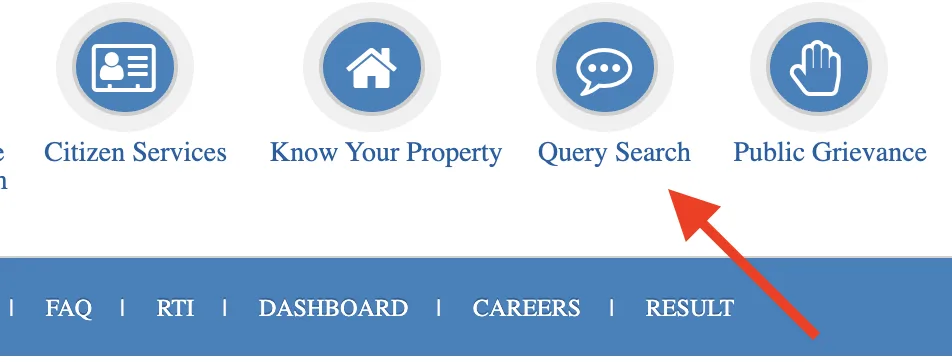
Try the Query Search method
If someone in your family had any land transaction in the past — buying, selling, mutation — there may be a Query Number associated with it. Go to Query Search on BanglarBhumi, enter the Query Number and Year, and the record will come up.
Visit your local BLLRO office
If online search isn’t giving you results, go to your Block Land Records Office (BLLRO). The staff there can search physical records and also tell you if the land data hasn’t been digitised yet. Carry any document you have — an old Khatian copy, property tax receipt, or sale deed.
Can Anyone Search by Owner Name — or Do You Need to Log In?
Basic searches on BanglarBhumi — including owner name search through “Know Your Property” — can be done without creating an account. You don’t need to register or log in.
However, if you want to do more — like downloading a certified e-Porcha (RoR certificate), applying for mutation, or requesting a Mouza map — you will need to create a free account and log in.
Without logging in — free
Owner name search, Khatian number search, plot number search, basic land details, land classification. All free, no account needed.
After logging in — some paid
Certified e-Porcha download (small fee), Mouza map request (small fee), mutation application, Khajna payment, GRN tracking. These need a registered account.
What Information Will You See in the Results?
Once you find the record, BanglarBhumi shows you:
This information is enough to verify ownership in most situations — including property purchase verification, loan applications, or checking ancestral records.
Using Owner Name Search to Verify Land Before Buying
This is honestly one of the most valuable uses of this feature. If someone is selling you land in West Bengal, you can verify their ownership claim in 2 minutes — for free — before you sign anything.
Here’s what to check:
Common Mistakes People Make When Searching by Name
| Mistake | What happens | Fix |
|---|---|---|
| Wrong Mouza selected | No results, even if the land exists | Cross-check mouza name with any old document |
| Name spelling mismatch | No results or wrong record appears | Try 2-3 spelling variations of the name |
| Using nickname instead of official name | No results found | Use the full legal name as on Aadhaar or ration card |
| Wrong Block selected | Mouza list shows wrong options | Confirm block name from old land documents |
| Captcha not loading | Can’t submit the search | Clear cache, switch to Chrome, try Incognito Mode |
| Land not digitised yet | Record genuinely not on portal | Visit local BLLRO office for physical records |
Frequently Asked Questions
To Sum It Up
Searching West Bengal land records by owner name on BanglarBhumi is straightforward once you know where to look. Go to Know Your Property, select your District, Block, and Mouza carefully, then choose the name search option and enter the owner’s name exactly as it would appear in official records.
If you don’t get results — check your Mouza selection first, then try different name spellings, then switch to searching by Khatian or plot number. If all else fails, a visit to your BLLRO office will always work.
And if you’re using this to verify a property purchase — great decision. A 2-minute check on BanglarBhumi before any land deal can save you from a lot of heartache later.
→ Complete BanglarBhumi Guide — Everything Explained Simply
→ What is Khatian and Plot Number — and How to Check Them
→ RS and LR Records — What’s the Difference and How to Check
→ How to Download e-Porcha (RoR) from BanglarBhumi
→ What is Mutation and How to Apply on BanglarBhumi
→ BanglarBhumi Portal Not Working? Here’s What to Do
Have a question we didn’t cover? Drop it in the comments and we’ll help you out.